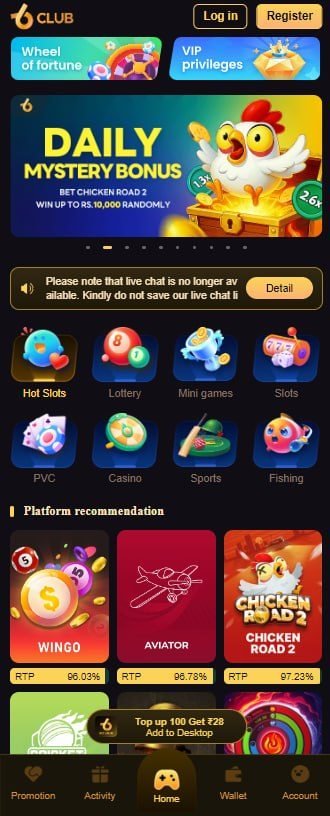
App aur browser view ke beech practical difference
Ek mobile app account sections ko compact tabs mein arrange kar sakta hai, jabki browser page directly URL se open hota hai. Historical 6Club dashboard mein lobby, wallet aur help icons dikhte the. Yeh sirf pehle ka visual reference hai, current app availability ki confirmation nahi.
Browser se milne wala download prompt automatically trusted nahi hota. Agar source unclear hai, version, developer identity, file permissions aur device security alerts inspect karo. Unknown app ko contact list, SMS aur accessibility permissions dena especially sensitive ho sakta hai.
Dashboard ko samajhna: tiles kis kaam aate hain
Game tiles, wallet badges aur event sections side by side hote hain, isliye first screen overwhelming lag sakti hai. Pehle labels aur icons samjho: kisi tile ka naam payment, game, profile ya support action indicate kar sakta hai.
App update ke baad icon placement change ho sakta hai. Ek purane screenshot se exact present-day button position confirm nahi hoti. Isiliye is page par images ko historical tag diya gaya hai, taaki visual explanation ko live instruction samajhne ki galti na ho.
Is page ke visual references old 6Club-related material se liye gaye hain. UI, available services, app features, offers aur payment processes time ke saath change ho sakte hain. 6club.ink independent informational site hai, operator account system nahi. Real-money outcomes ya payouts yahan guaranteed nahi kiye jaate.
Current interface ya policy ka decision lene se pehle original source, applicable rules aur current terms independently verify karna zaroori hai. Password, OTP aur personal financial information unknown contacts ke saath share na karein.
6Club Login & Register
Account labels aur interface ka context samajhne ke baad relevant entry action choose karein. External page new tab mein khulta hai.
Slow app, crash aur stuck loading kaise distinguish karein
Agar app open hote hi close ho jaye to storage aur compatibility likely factors ho sakte hain. Agar sirf images nahi load ho rahi, network ya cache issue ho sakta hai. Ek action ka error poori account service ke down hone ka proof nahi hota.
Repeated uninstall/reinstall karne se saved account details ya app-specific data clear ho sakta hai. Pehle device version, free storage aur error text note karo. Password manager ya account recovery method available hona chahiye before major changes.
Is point se connected questions ko 6Club Game aur Not Working pages par aur clearly explore kar sakte ho.
App security aur fake download pages
Similar logos aur download banners kaafi easily copy kiye ja sakte hain. File name mein 6Club likha hone se origin verify nahi hota. Unknown link se APK lene ke bajay platform identity aur source legitimacy evaluate karo.
Phone warning aaye to installation bypass karne ka pressure mat lo. Screen par flashy bonus claim ho to bhi app ko permissions dene ka decision independently lena chahiye. Account access aur financial details secure rehni chahiye.
App Screen Ko Kaise Read Karein
Screenshots mein top par logo aur neeche tiles dikhte hain, lekin har tile ek active feature ho zaroori nahi. Kuch panels marketing banners ho sakte hain aur kuch real navigation shortcuts. Visual hierarchy samjho: account access, game list, offers aur wallet ko alag categories mein categorize karne se unfamiliar layout less confusing lagta hai. Historical phone screenshot ka exact resolution bhi present-day device rendering se differ ho sakta hai.
App access issues ko troubleshoot karte waqt root cause ke three buckets useful hain: device, network aur account. Device issue tab suspect karo jab app open hi na ho; network issue tab jab icons/images selectively missing hon; account issue tab jab form particular credentials reject kare. Yeh categorization guaranteed diagnostic nahi, but random updates/install attempts se better starting point hai.
Agar unknown social media link tumhe “latest APK” ke naam par file offer kare, filename aur banner se authenticity decide mat karo. File permissions, signing identity aur source reputation relevant hain. Device ke banking apps aur SMS access ko protect karna priority rehna chahiye, especially jab service ki ownership verified na ho.
Ek Quick Checklist Jo Kaam Aayegi
Jab screen, label ya status confusing ho, ek hi baar mein sab actions karne ke bajay in checks ko individually apply karo. Small details notice karna impulsive steps se zyada helpful hota hai.
- App source aur publisher verify karo
- Version aur update date check karo
- File permissions carefully review karo
- Historical screenshots ko live UI na samjho
- Storage aur network check karo
- Account recovery information safe rakho
Common Issues Aur Practical Checks
Har problem ke liye same fix fit nahi hota. Neeche symptom aur useful next check side by side rakhe hain taaki diagnosis direct rahe.
| Screen ya issue | What to check |
|---|---|
| App loading slow | Network aur free storage check karein |
| Images missing | Cache aur connectivity verify karein |
| Unexpected permissions | Install pause karke purpose evaluate karein |
| Update prompt suspicious | Publisher/source identity confirm karein |